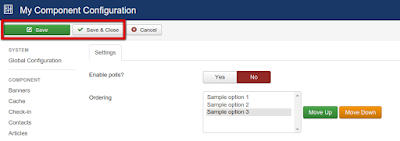
Ever wondered how to call custom javascript function before the component options form is posted when working with Joomla backend?
So, I had a situation when I wanted to call my own Javascript function before the component options form is submitted in Joomla backend.
So here is a one way that I found.
1. First find the "Save" and "Save and Close" buttons from toolbar
2. Change their "onclick" attributes to call your custom javascript code before form is submitted.
Here is a quick code snippet for that-
jQuery(document).ready(function(){
 /*Let's trick Joomla toolbar buttons Joomla 3.x*/

 /*Find Save button and change its onclick attribute
 by prepending its value with a call to your own javascript function*/
 jQuery("button[onclick=\"Joomla.submitbutton('config.save.component.apply')\"]").attr("onclick", "customFieldsValidation();Joomla.submitbutton('config.save.component.apply')");

 /*Find Save and close button and change its onclick attribute
 by prepending its value with a call to your own javascript function*/
 jQuery("button[onclick=\"Joomla.submitbutton('config.save.component.save')\"]").attr("onclick", "customFieldsValidation();Joomla.submitbutton('config.save.component.save')");
});
Loading a language file for a joomla plugin- If this is how your xml code looks for including a language file myPlugin.xml
<languages folder="language/en-GB">
<language tag="en-GB">en-GB.plg_pluginType_myPlugin.ini</language>
</languages>
PHP code below myPlugin.php
/*load language file for plugin frontend*/
$lang = JFactory::getLanguage();
$lang->load('plg_pluginType_myPlugin', JPATH_ADMINISTRATOR);
This will load your language file for the plugin and you can use language constants in the plugin.
When using Amazon S3, here's some easy to use code snippets to fetch JomSocial Photo thumbnails, Video thumbnails, Group Avatar thumbnails etc..This is missing in the JomSocial Docs...
/*TO GET THUMBNAILS FOR JOMSOCIAL PHOTOS*/
//first get photo ids from local database
$query="SELECT  a.id, a.thumbnail FROM  jos_community_photos AS a”;
$db->setQuery($query);
$row  = $db->loadObjectList();
//JS API - this is used or getting thumbnails for JS photos
CFactory::load( 'models' , 'photos' );
$photo =& JTable::getInstance( 'Photo' , 'CTable' );
if(!empty($row))
{
    foreach($row as $data)
    {
     $photo->load( $data->id );
     $thumbnail    = $photo->getThumbURI();
     $data->thumbnail=$thumbnail;
    }
}
//now $row will be having thumnails from local OR amazon s3 whatever applicable
/*TO GET THUMBNAILS FOR JOMSOCIAL VIDEOES*/
//first get video ids from local database
$query = "SELECT v.id,v.thumb FROM #__community_videos as v”;
$db->setQuery($query);
$video_result = $db->loadObjectList();
//JS API - this is used for getting thumbnails for JS videos
CFactory::load('models' , 'videos');
$video    =& JTable::getInstance( 'Video' , 'CTable' );
if(!empty($video_result))
{
foreach($video_result as $data)
    {
     if(($video->load($data->id)) && ($data->thumb)){
      $data->thumb=$video->getThumbnail();
     }
     else{
$data->thumb=JURI::root().'components'.DS.'com_community'.DS.'assets'.DS.'video_thumb.png';
   }
     }
   }
//now $video_result  will be having video thumnails from local OR amazon s3 whatever applicable
/*TO GET GROUP-AVATAR FOR JOMSOCIAL GROUPS*/
//suppose you want to get a group avatar thumbnail for a group having groupid=3
//then use following code
$gid=3;
CFactory::load( 'models' , 'groups' );
$group=& JTable::getInstance( 'Group' , 'CTable' );
$group->load( $gid);
$avatar_img_source=$group->getThumbAvatar('avatar');
//now $avatar_img_source will be having the image source for group avatar thumbnail
/*TO GET USER-AVATAR FOR JOMSOCIAL USER*/
//suppose you want to get a user avatar thumbnail for a user having userid=3
//then use following code
$userid=62;
$user=&CFactory::getUser($userid);
$uimage = $user->getThumbAvatar();
//now $uimage will be having the image source for user avatar thumbnail